Analysis
Whose GitLab Permissions Does Your AI Assistant Use?
A read-only GitLab token can still expose a private repository to the wrong person. If an MCP server uses one shared credential for everyone, GitLab checks that credential’s access—not the access of the person asking the assistant.
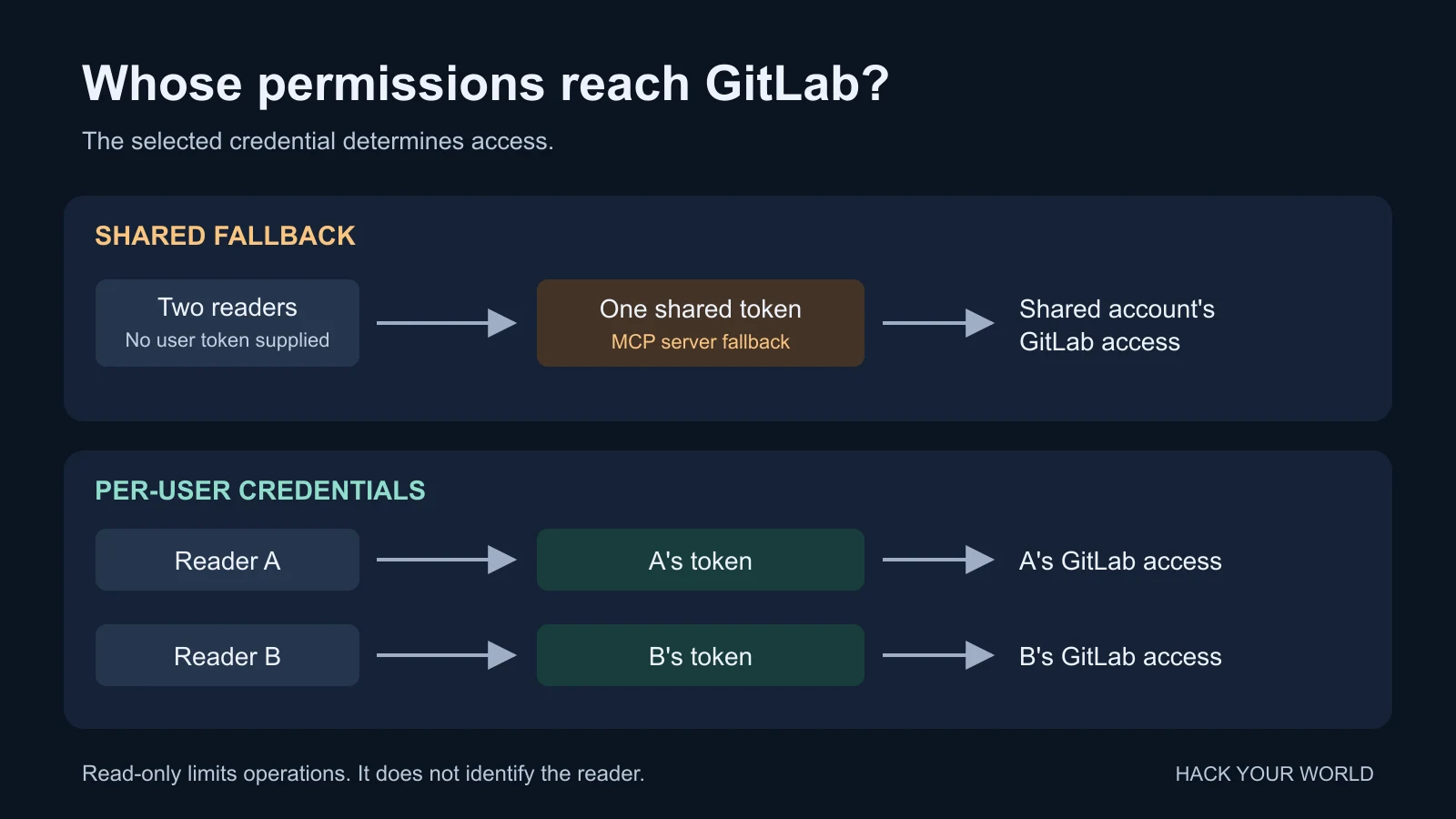
I maintain GitLab MCP. Its shared-token settings are convenient, particularly for a personal connector. They also need a more precise explanation than “read-only.” There are two separate decisions: which account makes the request, and what that account is allowed to do.
Start with whose repositories the assistant can read
Consider two engineers. One can read a private infrastructure project; the other cannot. Put the first engineer’s token in a shared MCP server, and requests using that fallback credential run with the first engineer’s access. A read-only scope stops certain changes. It does not make GitLab re-check the second engineer’s membership.
This is an example, not an incident report. A shared reader can be a reasonable choice when every person allowed to use the connector is also allowed to read everything that credential exposes. I would not use it as a shortcut around per-user access for a mixed-permission team.
GitLab’s personal access token documentation describes PATs as credentials attached to a user. Giving the variable a reassuring name does not change the token’s owner, scopes, or project access.
What the fallback settings mean in this server
The following describes the 2.2.4 source snapshot. The table assumes no user credential has already been selected and a normal structured tool, rather than one of the generic query tools.
| Server configuration | Read operation | Write operation |
|---|---|---|
GITLAB_READ_TOKEN only |
Uses the shared read fallback | Rejected by the server |
GITLAB_TOKEN only |
Uses the shared fallback | Uses the shared fallback; GitLab must still permit the operation |
| Neither variable | Requires a user credential | Requires a user credential |
| Both variables | Configuration is rejected at startup | |
A supplied user credential takes precedence over either fallback. That means GITLAB_READ_TOKEN is not a global switch that disables every write. A caller supplying a write-capable user token can use write tools. Conversely, putting a restricted token in GITLAB_TOKEN does not grant it permissions GitLab has withheld.
Use an appropriately restricted token upstream as well as the server’s read fallback. A server-side check does not reduce what a leaked credential could do if used directly against GitLab.
Per-user access needs more than an empty environment variable
For a team whose repository permissions differ, I would leave both fallback variables unset and supply credentials through the chosen client’s supported authentication path. Remove them from the process’s effective environment, including inherited service or container settings. Restart the server and reconnect clients after changing that configuration.
In this version, the tool handler checks explicit userCredentials arguments first, then the GitLab credential resolved by OAuth, then credentials associated with the HTTP session. The client falls back to the environment only when none of those provides a user credential.
That precedence matters: per-user means the credential selected for the operation. It is not a promise that the connector always ignores explicit credentials and uses the identity shown in a login screen. Do not paste tokens into a conversation to work around a client configuration problem; tool arguments and transcripts are additional places a secret can end up.
The non-OAuth HTTP path also retains supplied credentials in its session. A later request with no Authorization header does not clear them. Use separate, fresh sessions when testing different identities, and protect session identifiers rather than treating them as harmless debugging text. The OAuth path uses its validated MCP bearer to resolve GitLab credentials; it does not interpret that bearer as a raw GitLab PAT.
Leave the generic-tool and host restrictions in place
These settings belong in the MCP server process’s environment, not GitLab’s configuration or a prompt. They are already the defaults in the reviewed version; setting them explicitly makes the intended deployment easier to inspect:
GITLAB_PIN_HOST=true
GITLAB_ALLOW_SHARED_ESCAPE_HATCH=false
Host pinning keeps requests on the configured GITLAB_URL rather than accepting a caller’s alternate GitLab URL. It does not restrict which projects are visible on that host.
The second setting prevents the shared fallback from being used by execute_custom_query, execute_rest_read, and execute_rest_write. Those generic tools require user credentials by default, even when a shared token can use the named tools. A rejected generic query is not automatically a reason to enable the escape hatch.
The custom GraphQL path also inspects the document for mutations before choosing the read or write credential path. Calling something a query, or omitting a write flag, does not turn a mutation into a read.
Test with a project one account cannot read
A successful request using an administrator’s account tells you very little about separation between users. Before giving a team access, I would run this acceptance check in a disposable project containing only dummy data:
- Create two test identities with deliberately different access to the project. Confirm that difference directly in GitLab first.
- With shared fallbacks absent, open a fresh MCP session for each identity. Read a known dummy issue through the same named tool. Only the authorized identity should receive its contents; an inaccessible or not-found response is acceptable for the other.
- Open a third fresh session with no user credential. The read must not succeed through a forgotten server fallback. Do not reuse an authenticated session for this check.
- If evaluating a shared read fallback instead, explicitly test who can reach the connector and what that fallback exposes. Test a write only against disposable data with a credential expected to be denied. Stop if it succeeds.
- Repeat after changing the authentication mode or proxy configuration. Record the identity and expected result, never the token or full session identifier.
The repository’s configuration and client tests passed before publication: 11 tests covering configuration guards, generic-tool restrictions, mutation gating, and concurrency behavior. They make no live GitLab calls and do not establish that your deployment passes the acceptance check above.
For my own account, a narrowly scoped personal connector is straightforward. For a team, I would decide who should be able to read which projects before choosing the fallback token.