Analysis
Should I Replace My Lutron Caséta PD-6WCL Dimmers with Diva?
Keep a working PD-6WCL unless its button layout or three-way arrangement is a problem. For a new compatible dimming circuit, start with the Diva DVRF-6L for its physical slider and wired accessory-switch option.
In this article
The comparison that matters
| Question | PD-6WCL | DVRF-6L Diva |
|---|---|---|
| September 13 inventory | Nine reported PD-6WCL dimmers | Not installed or personally tested here |
| Neutral required? | No | No |
| Common dimmable LED load | Up to 150 W | Up to 150 W |
| Incandescent/halogen load, unganged | Up to 600 W | Up to 600 W |
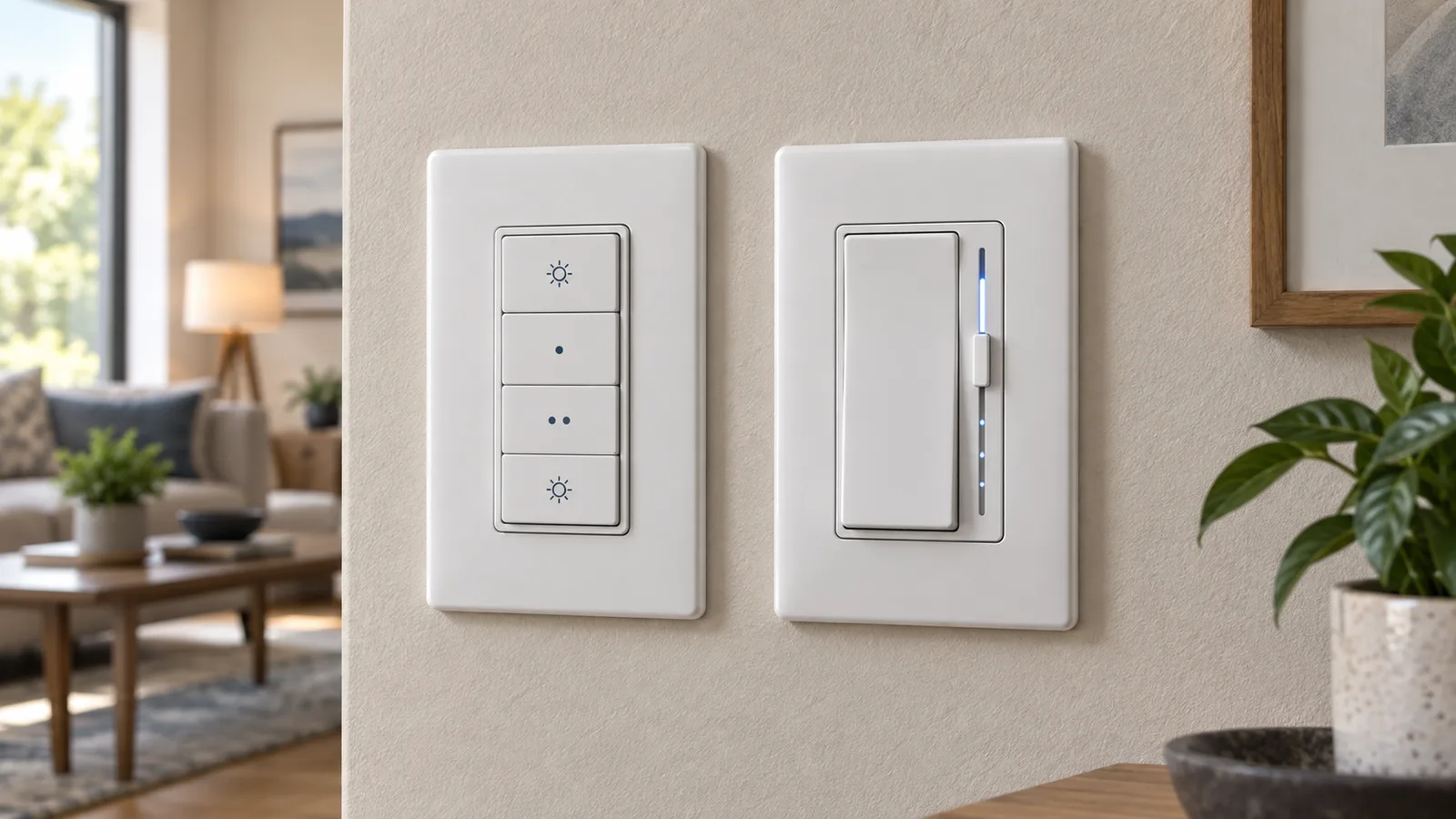
| Wall control | Separate on, brighter, dimmer, and off buttons | Paddle plus a physical level slider and light bar |
| Wired three-way choice | Not the reason I would select it today | Can use a mechanical switch or compatible Claro accessory control |
| Home Assistant path | Caséta Smart Hub | The same Caséta Smart Hub |
| My decision | Keep the working dimmers | Buy for a new compatible room |
Lutron’s load-control specification, page 5, reduces the incandescent/halogen maximum for both dimmers to 500 W at the end of a gang and 400 W in the middle. The LED row remains 150 W, with lamp compatibility and mixed-load instructions still applicable. The headline wattage is not the complete selection rule.
Why I am keeping the nine originals
The PD-6WCL is not obsolete merely because Lutron gave the newer model a better-known wall-control shape. Mine still do the job that made me move permanent lighting to Caséta: the light works at the wall, Home Assistant can control it through the hub, and neither depends on a smart bulb being left powered.
Replacing all nine would buy a different interface, not a new automation architecture. Home Assistant communicates with the Caséta Smart Hub and exposes supported wall dimmers as light entities. The Diva does not give me a separate or more local Home Assistant path. It joins the same lighting system.
That makes a whole-house swap hard to defend. I would pay for nine controls, spend time changing them, and discard functioning hardware while preserving the same 150 W LED ceiling for the common load type. A nicer paddle may be worth buying once. It is not enough reason for me to replace nine reliable dimmers.
What the Diva changes at the wall
The Diva’s advantage is easier to understand with the network turned off. Tap the broad paddle and the light returns to the slider’s level. Move the slider and the next press has an obvious physical target. Double-tapping on sends the light to full brightness. Lutron also gives it a soft-glow level bar.
The original dimmer uses four separate buttons. I know the layout because I live with it. A visitor has to decide which button means on, which one means off, and which two change the level. It is learnable, but it is not as immediately familiar as a paddle.
That difference is worth considering in a guest room, hallway, or any place where the wall control should explain itself. It is also why I would choose the Diva for a new room even though my original dimmers have given me no reliability reason to replace them.
The wired three-way option is the practical upgrade
I often use Pico remotes because they can add another control location without opening a wall or running traveler wires. The original PD-6WCL works well in that design. A Pico mounted in a wall plate looks intentional and can stay useful even when Home Assistant is unavailable.
The Diva adds choices when a room already has traditional three-way wiring. Lutron documents support for an existing mechanical switch or a compatible Claro smart accessory switch, as well as Pico remotes. The accessory control can provide matching paddle behavior from another location instead of leaving one side of the room with a different-looking toggle.
I would treat that as a room-by-room decision. If the existing second location is easy to understand and works, I do not need to replace it for symmetry. If I am already renovating the room or want matching multi-location dimming, the Diva’s supported wired options are a real reason to choose it.
What does not fit either dimmer
The matching watt numbers do not make these universal controls. Both comparison models are forward-phase dimmers for compatible dimmable loads. Lutron explicitly says the DVRF-6L is not rated for ELV or MLV lighting loads, and its guidance routes those loads to different controls. A light that buzzes, flickers, will not turn off cleanly, or has a driver requiring another dimming method is a compatibility problem—not a reason to keep changing trim until the symptom is hidden.
I would also not use either dimmer for a non-dimmable load, receptacle, motor, or ceiling fan. A Caséta switch or the dedicated PD-FSQN fan control may fit a different job, but the exact load and wiring decide that. The model reported by Home Assistant is useful inventory; it is not a substitute for the label on the control, the fixture documentation, or electrical verification.
This page is a buying comparison, not line-voltage installation instruction. I would shut off and verify power before inspecting a control, and I would use a qualified electrician when the circuit, load, or local requirements are uncertain.
Does the Diva work better with Home Assistant?
Not in a way that would make me replace a PD-6WCL. Home Assistant’s official integration talks to the Caséta Smart Hub, automatically discovers supported devices configured there, and exposes wall dimmers as lights. It classifies the integration as Local Push. That hub-centered design is the part I value.
The physical interface changes, but my automation rule does not: permanent lights should remain understandable at the wall. I can use scenes, schedules, motion, or voice without making Home Assistant responsible for the basic act of turning on the room.
I would still use a Matter bulb only where an in-wall control does not fit—such as a small lamp that can remain powered. Replacing a good Caséta dimmer with smart bulbs behind an ordinary switch would move the reliability boundary in the wrong direction.
My keep-or-replace rule
- If a PD-6WCL is working, I keep it. A different button shape is not a reliability upgrade.
- For a new ordinary dimmable-light circuit, I start with the DVRF-6L. The paddle and slider are easier to explain, and the wired three-way options are more flexible.
- I verify the load before ordering. “LED” is not enough; the lamp or fixture must be dimmable and compatible with the control’s phase and rating.
- I do not buy the Diva for a better Home Assistant integration. Both models belong behind the same Caséta hub.
- I choose another control for another job. Switches, fans, ELV/MLV loads, and smart lamps need their own decision.
For the neutral-wire split across the controls actually installed here, see which Caséta models in my house need a neutral. For the bigger lighting decision, read where I would use a Matter bulb instead of Caséta. My broader buying rules are in the Home Assistant hardware I would buy again.
What I own and what I only researched
The installed count comes from the Home Assistant device registry reviewed September 13, 2026. The PD-6WCL and DVRF-6L ratings and wiring options come from Lutron’s original Caséta dimmer guidance, the DVRF-6L product guide, and Lutron’s current Caséta literature. The hub behavior comes from the Home Assistant Caséta documentation.
I have not installed or personally tested a DVRF-6L in this house. My recommendation for a new room is based on the documented electrical boundary and wall-control design, while the reliability experience belongs to the nine PD-6WCL dimmers I actually run.
Disclosure: I own and use nine PD-6WCL dimmers. The Diva comparison is based on current Lutron documentation.